- A technical SEO audit checks whether search engines and AI crawlers can crawl, render and index your site.
- The core process: crawlability and indexation, index errors, Core Web Vitals, site architecture, then structured data.
- Free tools cover it: Google Search Console, Screaming Frog (500 URLs free) and PageSpeed Insights.
- In 2026 a technical audit must also confirm AI crawlers like GPTBot and PerplexityBot can reach your pages.
A technical SEO audit is a review of the technical foundations that let search engines crawl, render and index your website: crawlability, indexation, site speed, architecture and structured data. It finds the under-the-hood problems that stop your pages from ranking even when the content is good.
This guide walks through how to conduct a technical SEO site audit step by step, with a copyable checklist and the free tools to do it. It is the technical deep-dive within our complete SEO audit guide. Pair it with the broader SEO audit checklist and the tools comparison.
What is a technical SEO audit?
A technical SEO audit is the part of an SEO audit that focuses on infrastructure rather than content. It answers one question: can Googlebot (and other crawlers) reach, render and index every page you want ranked, quickly and without errors? When the technical foundation is broken, no amount of great content will rank.
Technical vs on-page vs off-page SEO
- Technical SEO: crawling, indexing, speed, architecture and schema (this audit).
- On-page SEO: titles, headings, content and internal links on each page.
- Off-page SEO: backlinks, referring domains and authority signals.
- Local SEO: Google Business Profile, citations and local rankings.
These overlap. Technical and on-page work together, so run this audit alongside the broader SEO audit checklist for full coverage.
Technical SEO for AI crawlers and answer engines
A 2026 technical audit must also confirm that AI crawlers can reach your site. Answer engines use their own bots, GPTBot (ChatGPT), ClaudeBot (Claude), PerplexityBot (Perplexity) and Google-Extended (Gemini and AI Overviews), and each must be allowed in robots.txt or you become invisible to that engine. Heavy JavaScript rendering that hides content from these bots is a common, silent blocker. This AI-crawler layer is what classic technical audits miss; learn it in our AI SEO guide.
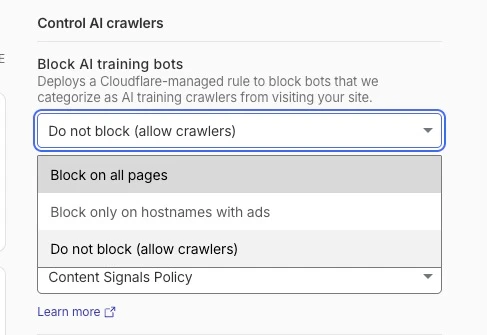
Cloudflare has a setting that blocks what it calls AI training bots, and it is sometimes switched on by default. The catch is that the same control also governs the AI search crawlers (GPTBot, PerplexityBot and the rest), so leaving it on can make your site invisible to AI search without you ever noticing. In your Cloudflare dashboard, find the Block AI training bots control under the AI crawler settings and set it to Do not block (allow crawlers) so the answer engines can reach you.
How to conduct a technical SEO audit
Run these six steps in order. Each builds on the last, and most can be done with free tools.
Step 1: Crawlability and indexation
Start by confirming search engines can find and access your pages. Check that robots.txt does not block important sections, that your XML sitemap is submitted and current in Google Search Console, and that the GSC Pages report shows your key URLs as indexed. Crawl the site with Screaming Frog to find what the sitemap misses, including orphan pages with no internal links pointing to them.
Step 2: Fix index errors
Next, hunt for pages excluded from the index by accident. Look for stray noindex tags, incorrect canonical tags pointing to the wrong URL, soft 404s (thin pages Google treats as errors), and redirect chains where one redirect points to another. Each of these quietly removes pages from search; the GSC Pages report names the exact cause for every excluded URL.
Step 3: Site speed and Core Web Vitals
Then measure page experience. Run your key templates through PageSpeed Insights and check the three Core Web Vitals: Largest Contentful Paint (LCP, loading), Interaction to Next Paint (INP, responsiveness) and Cumulative Layout Shift (CLS, visual stability). Use the Core Web Vitals report in Search Console for real-user field data across the whole site, not just one page.
Step 4: Site architecture and internal linking
Audit how pages connect. Important pages should be reachable within a few clicks of the homepage, every page should have internal links pointing to it (no orphans), breadcrumbs should reflect a logical hierarchy, and anchor text should describe the destination. Strong internal linking spreads authority and helps both Google and AI crawlers understand your topic clusters.
Step 5: Structured data and schema
Check your structured data. Validate schema markup (Article, FAQPage, Product, Organization and so on) with the Schema Markup Validator and Google's Rich Results Test, fix any structured data errors, and make sure JSON-LD reflects what is actually on the page. Clean schema earns rich results in Google and gives AI engines explicit signals about your content.
Step 6: Advanced checks (hreflang, log files)
For larger or international sites, go deeper. Validate hreflang tags so the right language and region version ranks in each market. Run log file analysis on your server logs to see how Googlebot actually spends its crawl budget: which pages it crawls often, which it ignores, and where it wastes requests on low-value URLs. This advanced technical SEO audit step surfaces issues no surface crawl can.
Technical SEO audit checklist
Use this technical SEO audit checklist (also covers the seo technical audit checklist variants) as a copyable summary of the process above.
- robots.txt does not block important pages or AI crawlers (GPTBot, PerplexityBot, Google-Extended)
- XML sitemap is submitted, current, and free of errors in Google Search Console
- Key pages show as Indexed in the GSC Pages report
- No accidental noindex tags on pages you want ranked
- Canonical tags point to the correct preferred URL
- No soft 404s or thin error pages
- Redirect chains collapsed to a single 301
- All pages reachable within a few clicks; no orphan pages
- HTTPS active with a valid SSL certificate and no mixed content
- Core Web Vitals (LCP, INP, CLS) pass on mobile and desktop
- Mobile-first indexing: content and links match across devices
- Structured data validates in the Rich Results Test
- hreflang correct for multilingual or multi-region sites
- Internal linking spreads authority to priority pages
Members get the complete 50-point technical SEO audit template as a Google Sheet, with severity ratings and a fix tracker. Join the community to grab it.
DIY vs done-for-you technical SEO audit services
You can absolutely run a technical SEO audit yourself with the free tools above, and most business owners should at least once, because it teaches you how your own site works. Technical SEO audit services (done-for-you) make sense when the site is large, when a migration has gone wrong, or when you simply do not have the time.
Inside the AI Ranking community, we sit in the middle: you run the audit with our guidance and tooling, and get feedback on your findings from people doing the same work. That keeps the cost low and builds the skill, instead of handing you a report you cannot act on.
Best technical SEO audit tools
Start with a baseline
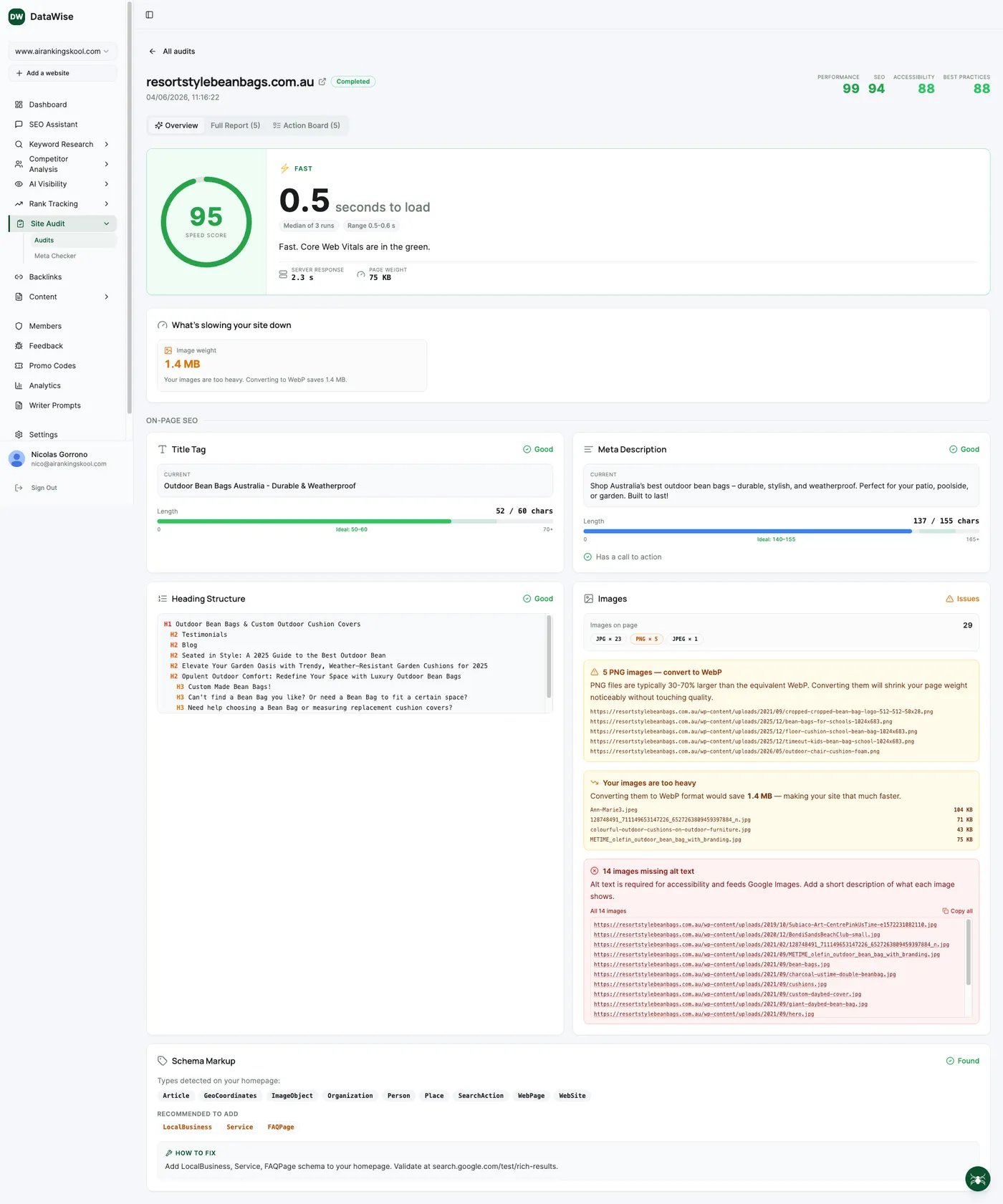
Before you change anything, run one automated audit so you know exactly where your site stands. Community members start with the Site Audit in DataWise (free for members): it scores your speed, on-page SEO, schema and AI-crawler readiness in a single pass and hands you a prioritized fix list, so you fix the things that matter first instead of guessing.
Test speed with at least two tools
For speed specifically, do not rely on a single score. Run your key pages through both GTmetrix and Google PageSpeed Insights, because each reports slightly different metrics and gives you a fuller picture. If one tool says your site is fast and the other says it is slow, treat that disagreement as a signal to look deeper rather than trusting either number on its own.
One important caveat: always test speed with these tools, not by loading your own site in your browser. Modern browsers cache (save a local copy of) the files for sites you visit often, so a page loads faster for you on repeat visits. That is not what a brand-new visitor experiences. The testing tools measure a cold, first-time load, which is the number that actually matters.
Go deeper when you need to
If you want a more detailed crawl of the whole site, you will likely need a dedicated tool like Screaming Frog (free up to 500 URLs). It surfaces far more than a quick audit does, broken links, redirect chains, duplicate titles, crawl depth and more, but it is more of a professional tool, so reach for it once you are comfortable with the basics.
The rest of the core technical tools are free too: Google Search Console for indexation and Core Web Vitals, PageSpeed Insights for speed, and the Rich Results Test for schema. Paid platforms like Ahrefs Site Audit, Semrush Site Audit, Sitebulb and Lumar add scheduled crawls and prioritization. See the full SEO audit tools comparison for details.
Run your technical audit with the community
Get the technical audit template, DataWise free, and feedback on your fix list from people running the same audits. Join AI Ranking.
Learn SEO Audits hands-on inside the community
Courses, live calls and DataWise to run a full automated audit and get a prioritized fix list.